We just spent two and a half days in Copenhagen, to start our summer vacation. The first day we arrived early in the afternoon, and it was raining and just dark, dank, and uncomfortable. Well, maybe not that bad, but since we walked from the train station to our hotel in the rain, it felt that way. I thought it would be at most a quarter-mile, but it was more than twice that far, so we got twice as wet. We were exhausted from the flights (Laurie and I were on different planes, on different airlines, to get good ticket deals), so we broke my self-imposed rule of staying up until at least 8:00, and went to sleep around 4:00… and slept until 6:00 the next morning!
June 30, 2007
May 15, 2007
Comment Spam Surprise
I never got comment and trackback spam on this blog, until about three weeks ago. Then I started getting swamped by it. What happened?
I switched the URL for MovableType CGI functions (used for searching, commenting, and managing the blog) from HTTPS (i.e., a “secure” page) to just plain HTTP. I did this because the older version of OpenSSL I had been using had a known insecurity, and I didn’t feel like rebuilding all the software. It was easier to just turn SSL off.
So these automated spambots don’t know how to spam sites using SSL? Or maybe they just don’t know they should try. Either way, it’s interesting. I may go to the trouble of rebuilding the software soon so I can go back to the old way. In the mean time, I’m trying to require TypeKey authentication for comments, which I don’t think I have working right.
Comments Off on Comment Spam Surprise
May 13, 2007
Photos from Budapest
The HEEP Area 5 meeting was in Budapest this April, and I attended along with about 50 others from Central Europe and the US. The meeting lasted three days, but those of us from America stayed almost a week, during which our hosts showed us a lot of the city and nearby parts of Hungary (and fed us a lot of great food). I took a lot of pictures, and have posted them here.
Comments Off on Photos from Budapest
April 13, 2007
Installing Perl Modules without root
I just got this working, and I know I’m going to want to know how to do this a year or two down the road, and I’ll have forgotten by then. Hence, this blog entry.
You install prebuilt Perl modules in Windows using ActiveState’s Perl Package Manager (ppm). If you’ve got a full build environment, you can use the CPAN module instead.
Under Unix/Linux, you just use CPAN, because you generally have a full build environment. But Unix/Linux is a multi-user, secure environment, and unless you are the superuser, you can’t install modules normally with CPAN. That’s because they need to get installed to system directories and you can’t write to them.
But you can create your own personal libraries, and configure CPAN to use them.
1 – Create subdirectories under your home directory for the libraries. I think you can just create the main directory you need, but I created several others to be sure:
$ mkdir ~/myperl
$ mkdir ~/myperl/lib
$ mkdir ~/myperl/man
$ mkdir ~/myperl/man/man1
$ mkdir ~/myperl/man/man3
2 – Configure CPAN to install to your local directories:
$ cpan
cpan> o conf makepl_args PREFIX=”~/myperl”
cpan> o conf commit
cpan> quit
3 – Set the PERL5LIB environment variable to point to the library directory you are using:
$ PERL5LIB=~/myperl/lib
$ export PERL5LIB
Now you can use CPAN as a normal user (but it will only install modules for you to use). Remember that the CPAN settings are saved, but you’ll have to set the PERL5LIB variable each time you log in, or else save it in your .bash_profile or .bashrc initialization file. I don’t use bash much, so I’ll probably have to look this up if I want to do it.
Updated: Laurie tried this, and found some issues. I fixed the main one above.
This is just about right, but the first line of the configuration in step 2 should be:
o conf makepl_arg "PREFIX=~/myperl"
And this still didn’t work for me, so I had to use the longer version:
o conf makepl_arg "LIB=~/myperl/lib \
INSTALLMAN1DIR=~/myperl/man/man1 \
INSTALLMAN3DIR=~/myperl/man/man3"
March 7, 2007
Mega Millions – I won!
I just looked at the winning numbers last night, and I saw that I won! Again! My streak is unbroken.
I take a contrarian approach to the lottery – I bet that a particular set of numbers won’t be chosen. If I’m right, I win one dollar, the amount I would have wasted if I’d bought a ticket.
By applying this strategy consistently each week ever since Georgia adopted a lottery, I’m ahead hundreds of dollars. That’s far better than most lottery players.
March 4, 2007
Dumping Vista
After less than two weeks, I’m dumping Vista. I’ll migrate back to XP next week, when I’m next in the office and can borrow a second laptop for a few days to make the switch.
Why am I doing this? Well, I spent an average of four hours per day trying to get my PC to do what I needed to do with it, sometimes without success. The last straw was Thursday, when I was supposed to give an internal demo, and Vista problems made it impossible. I can’t afford to spend so much time dealing with Vista, and I can’t afford to have my PC fail at so many essential tasks.
I’d made the change so that I could learn more about Vista. I expected some glitches, but nothing I couldn’t handle. And moving to Vista seemed inevitable. Sooner or later, our customers will move, and we’ll need to stay consistent with them.
I now wonder if moving to Vista really is inevitable. It is so seriously and fundamentally broken that it may actually fail in the marketplace. The core of the operating system is probably fine, but there is so much complexity layered on top of it for a variety of reasons that it is a constant battle to use it. And those extra layers, mostly put on to add security to a foundation that lacks it, are responsible for making lots of existing software that should work fine in Vista fail.
I’ll put up a few more posts about my experiences with Vista, which may help me if I ever again try to use it (which won’t be until Microsoft has issued a major service pack, at the earliest). And I’ll talk about the things I’ll miss when I leave Vista for XP.
February 28, 2007
Using Vista – The Early Days
It’s been a week since I first posted about moving to Vista, and I said I’d put up a detailed post about the experience. One reason I haven’t done that yet is due to the experience. I’ve been battling a lot of issues with Vista. They’re not all Vista’s fault (some of them are due to other software issues that are being manifested because of Vista, and some of them are just changes from XP, not errors), but they’ve been real time-eaters.
I think I’m just about fed up with Vista. There are a lot of nice new things in Vista, and I’m going to have to use Vista sooner or later, anyway, so I had come into this with a positive attitude. But Vista is wearing me down.
So, in this post, mundane issues I encountered on day one. Further days to follow, if I have any time to post in between overcoming problems created by Vista.
February 22, 2007
First impressions of Vista
I’m settled in to the new PC now, and will bit by bit post my notes on how it went. In a nutshell, instead of taking an evening to migrate, it took two evenings and a full day in between. But it’s not all Vista’s fault. I also changed e-mail programs and upgraded to a major new version of the Apache web server. It’s only about 90% Vista’s fault.
February 21, 2007
ThinkPad/Vista “bug”
I am migrating to a new PC (a ThinkPad T60p) and a new operating system (Windows Vista). I completely wipe and reinstall everything on my PC about twice a year, anyway, and I’ve got it going pretty smoothly. But this time, it’s taken days for me to get the new PC working well enough for me to switch to it.
I’ll be writing about the issues I’ve faced in the next several days, but I had to post about the one I just had. On my new PC, Microsoft Outlook 2003 couldn’t save the calendar as a web page. I tried saving it to my network drive for others to see, and Outlook crashed.
It turned out that I had turned network discovery off. Once I turned that back on, though, it still wasn’t saving the calendar, though it wasn’t crashing any more. Instead, when I clicked to save the calendar, nothing happened. The dialog box just closed.
I tried lots of fixes. Saving to a local file. Saving only one month (maybe the DST date switch was causing problems). I’d started searching Google for answers, with little luck.
And then I noticed something. The new calendar was showing in the web page, where I’d saved it. Yes, once the network discovery was turned back on, Outlook started saving it properly immediately. I’d been trying to fix something that wasn’t broken.
Why? Well, I was primed to see a bug after the first crash. And then, when the Save dialog box finished immediately, I knew it wasn’t working. I’ve been saving my calendar from Outlook 2003 for years, and I know what should happen. When I click Save, a progress dialog box pops up and shows me how quickly it’s saving the web page. This takes about a full minute. When the Save finished instantaneously this time, I knew it was broken.
Or I thought it was broken. It just turns out this new PC saved the calendar blazingly faster than my older PC (which was a pretty decent ThinkPad T43). I don’t know whether it’s all the PC, or all Vista, or some combination, but there is certainly an enormous speed up in some areas.
Saving a minute here and a minute there will eventually make up for the extra 20 hours or so it took me to get all my software working on this new platform. Sure it will.
February 13, 2007
Out of control

Google Mail keeps 30 days of spam before automatically deleting old messages. Today was a milestone: my spam folder has more than 10,000 messages. More than 300 per day.
And this isn’t even all the spam I get! I get a couple dozen more spam messages per day to my direct personal e-mail accounts, and about a hundred a day to my work account. I’ve given up on managing it all. I don’t even check my spam folders for false positives anymore unless I’m expecting a message and haven’t yet seen it.
Comments Off on Out of control
January 29, 2007
XHTML 1.1 Quick Reference is gone!
I have been using the fantastic XHTML Quick Reference from “ddcc” at MIT for years. It’s a fantastic resource: a hypertext reference to all the elements of XHTML 1.1 and their allowed attributes.
Or, it was. Today when I clicked my bookmark, I got a “File Not Found” response. I guess “ddcc” whoever he or she is, has left MIT. But I really need that guide!
I’ll just google it! But I can’t find it copied anywhere. How about Google’s cache? Hooray, it’s there! But, of course, the links don’t work. I see in the cache that the whole guide can be downloaded, but the download link doesn’t work. Why didn’t I download a copy when I could?
Hmm… when I could… The Internet Archive Wayback Machine to the rescue. Just put the URL that used to work in the search box, and get links to how the page looked on various dates. I could probably just change my bookmark to the latest copy, but there’s an even better option: the download link works here! The Wayback Machine fixes the links, and points to its own archived copy of the file. Thanks, Mr. Peabody!
And so I don’t lose it again, I’ve put a copy of the guide on my website. The download link even works there, so you can grab a copy for yourself, too. The document is offered under the GNU Free Documentation License, so it’s perfectly okay for you to copy it.
Comments Off on XHTML 1.1 Quick Reference is gone!
June 28, 2006
Pisa
Today we saw Pisa, famous for its leaning tower:

But the tower isn’t alone. It sits on a stunning green “Field of Miracles” with three other beautiful buildings. One of them is a cathedral (the Duomo) right next to it:
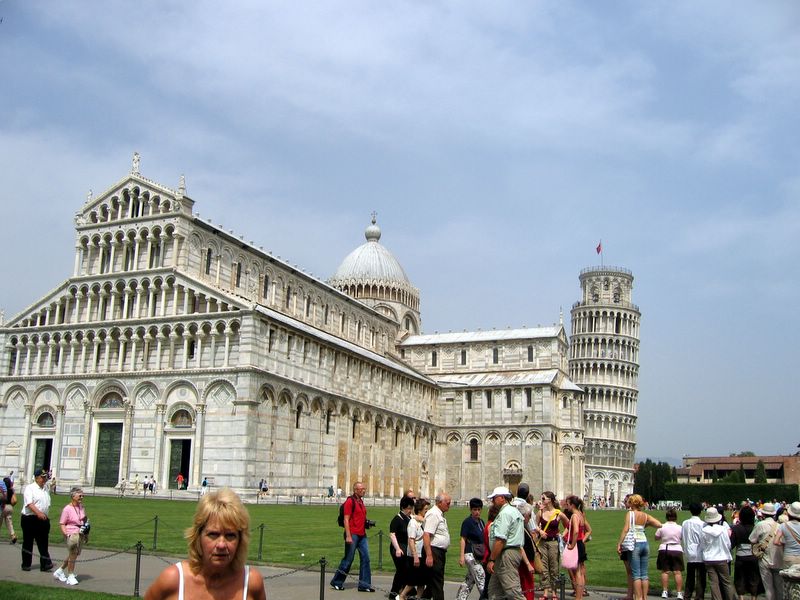
Galileo went to church here, and got bored during the service. The chandelier in this picture is a replica of the one that was there in Galileo’s day, and it was swaying as he watched it:

He timed the period of the sway by counting his pulse, and started working out some laws of motion. You can’t see it in this picture, but there’s a cable halfway down the chandelier support, anchoring it to the wall. Sure, it might just be for electricity, but I think it’s to keep it from swaying and inspiring another troublemaker like Galileo.
Comments Off on Pisa
June 26, 2006
Pantheon
On our last full day in Rome, we saw the Pantheon. It was built over 2000 years ago, and rebuilt only slightly more recently. It looks interesting from the outside:

Inside, it’s more impressive:

But it’s the dome with an opening at the top that blows you away:

This was the largest dome ever built anywhere until 1960 (so says the tourist guide, anyway). It’s the prettiest for sure. The light from the opening illuminates different sections throughout the day:
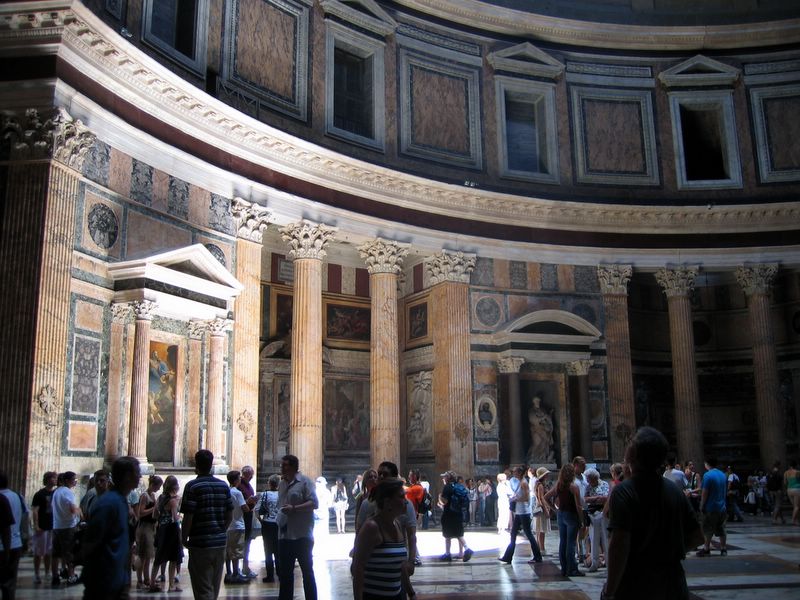
So I made Laurie pose in the light. It’s a bit dazzling, but a pretty nice picture:

Comments Off on Pantheon
Colosseum
On our first full day in Rome took a tour. The tour wasn’t very good because the guide rarely told us anything about what we were seeing. (When in Rome, don’t deal with Vastours.) But what we saw was fantastic. The highlight was the Colosseum.
As you enter, you can look through the arches into the interior:

Once you’re inside, the view through the arches outside is beautiful:
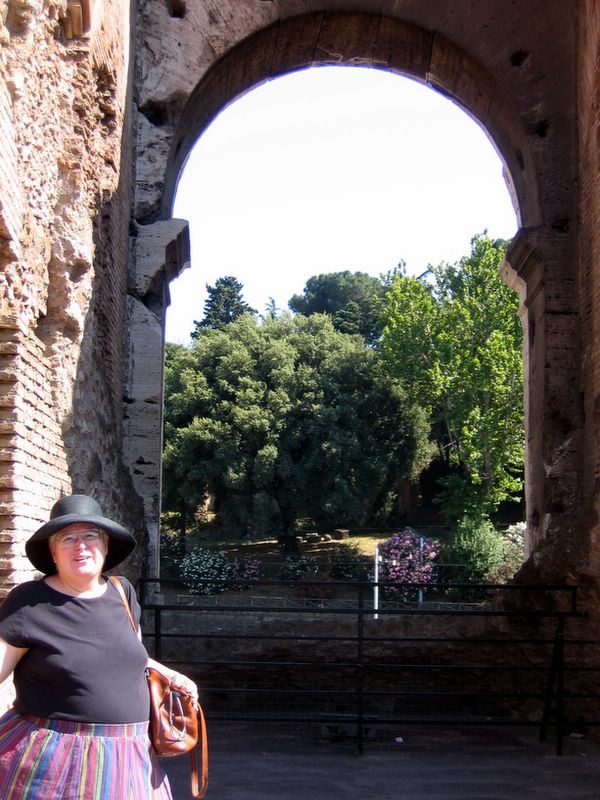
Though the structure was plundered over and over again for materials, there’s still plenty standing, and it’s plenty impressive:

We ended our tour on top of the Capitoline Hill, looking over the ancient city, with the Colosseum in the background:

Comments Off on Colosseum
The Appian Way
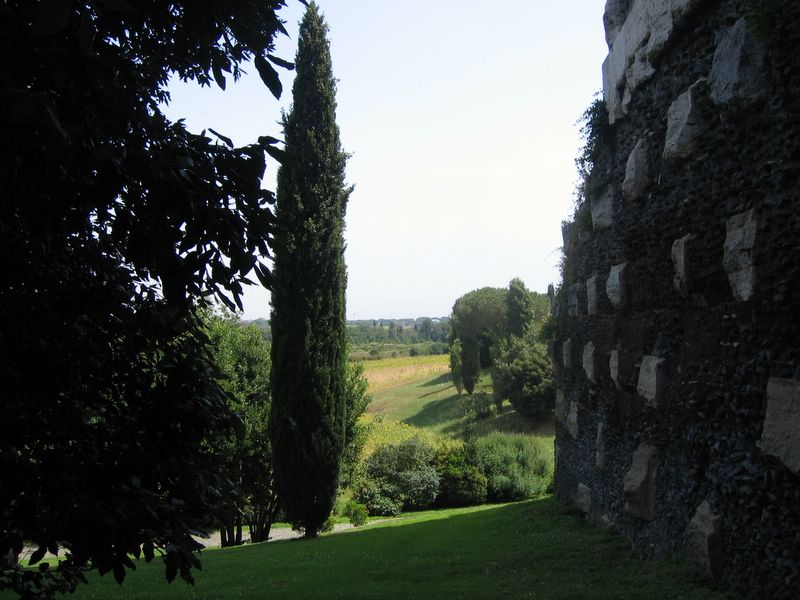
There’s a new Appia Way in Rome, but the original, 2300 year old one is still there, and still used. I walked a tiny bit of it today. (I would have done more, but it is hot here right now!)
This sign isn’t original, of course. They didn’t used to call it “Antica” after all.

They’ve excavated some of the original paving stones in this stretch.

But to get a sense of what it might have been like long ago, you have to look off to the side of the road:

Comments Off on The Appian Way
June 6, 2006
Groove is Dead
Well, not quite yet, but it’s definitely terminal. When Microsoft bought the company, this seemed a likely outcome, and today they confirmed it by announcing Microsoft Office Groove 2007 BETA. From the FAQs, it’s clear that there will be a product with Groove in its name, but the Groove we’ve known will cease to exist.
Groove’s glory was its lack of infrastructure. For $50 you bought Groove and installed it on your PC. If someone you knew did the same, you could create and share a Groove space. No servers to manage, so services to subscribe to. Sure, there were servers “out in the cloud” on the Internet, but they were managed by Groove, not you, and your purchase entitled you to use them. And public key cryptography prevented any disclosure of your data to those servers, even as they relayed it to other, authorized, users. And users with different versions of Groove could still usually share workspaces with each other, or at least most of the contents of the workspaces.
It was beautiful. But Microsoft doesn’t work that way. So Groove will no longer work that way.
Buy Groove once and use it for good, paying for upgrades if you wanted them, or skipping them if you preferred? No more. Now you will “subscribe” to Groove, instead of buy it. After all, Microsoft says that, “In talking with customers, we found that the flexibility to purchase Groove on a subscription basis held strong appeal with small businesses and workgroups, primarily due to the lower up front cost and the ability to get software updates made available during the term of the subscription.” Sure, we all hated that one-time $50 cost! (To be fair, Groove raised the price repeatedly with each new version, but it never got to be high enough to impede getting external business partners to buy it and give it a try.)
Install the client and go? No infrastructure, just use those Groove servers out in the cloud? No, no, no. You’ll have to buy Office Groove Server 2007 or Office Groove Enterprise Services. And, though the FAQs don’t mention it, that software will have to run on a Windows server, and I’m sure you’ll need a separate CAL for each user. Oh, and you’ll either have to put them directly out on the Internet (which I don’t like to do with Windows servers) or else make sure everyone you connect with has a VPN connection to your Intranet.
Well, maybe I’ll just stay with my current version of Groove. Not if anyone you plan to share workspaces with moves to the new Groove. “Anyone you invite to a workspace created with Office Groove 2007 must upgrade in order to accept the invitation.” Although, if you create the workspace with an older version, you can invite people with the new versions to it. For now.
Despite all that, do you want to give it a try? “The most important thing to know about upgrading to Groove 2007 is that this is a one way trip.” So don’t expect to just try. Not even on a test PC. You have to upgrade not only your Groove software, but also your Groove license, after which every other PC you use Groove on has to also be updated. One way.
This is a real shame. Groove was a great product that did pretty much one thing (securely sharing files with anyone, anywhere), and did it superbly. But that’s not sexy, and it never sold well. Groove also had a lot of other capabilities, but I never saw any of them get used anywhere near as much as the file tool. I don’t think that the new Groove will have any real value. If you’re going to have everybody you collaborate with work on a single Microsoft server, you already have (more complicated) ways to share data.
Comments Off on Groove is Dead
January 24, 2006
Building Apache Tricks
I seem to have left a few tricks out of my post on how to build Apache using Microsoft’s free tools.
First, you need to have awk on your PC and in your path. In fact, you need to have a version of awk that is happy with backslashes in file names. If you don’t have it, you will get very cryptic error messages when building. The awk I’m using is direct from Brian Kernighan (the k in awk). It’s available here. However, be sure to save it as awk.exe, not awk95.exe, and put it somewhere in your path.
The other problem I had was with the cvtres.exe program. This is part of the .NET framework, which my prior notes included installing, but it’s not in the path by default. Add its directory to your path. On my PC, that’s C:\Windows\Microsoft.NET\Framework\v.1.1.4322.
Comments Off on Building Apache Tricks
December 23, 2005
Neulasta
Treating cancer is expensive. I knew that. But I can still be shocked. Really shocked. $5900 for a single shot shocked!
You read that right. The bill we got for a single 6mg injection of Neulasta was $5900. That’s a bit less than $28,000,000 per ounce. Of course, you don’t just get the 6mg of Neulasta; it’s diluted in solution. Perhaps a fairer way to look at the cost is by volume. That’s only about $50,000 per teaspoon. (Don’t spill it!)
Luckily, we don’t have to pay that much. First of all, Laurie’s insurance has a discount negotiated with the doctor, and the discounted price is only $3687.50 per injection; barely more than $17,000,000 per ounce or about $30,000 per teaspoon. (Medicare gets an even better deal: $2938.40 per shot. Drugstore.com charges about the same “low” price as Medicare.)
In fact, we aren’t having to pay a cent. Laurie’s excellent insurance has a $1500 per year “out of pocket” limit. We hit that almost instantly once she was diagnosed with breast cancer, and everything since then has cost us nothing. (We’ll start paying again in January until we hit the limit, which will happen very quickly.)
Still, it’s not free… everyone is paying for it via health insurance and Medicare taxes. Is it worth it?
Yes. I’d like it to be cheaper, and hope it will get cheaper. But it’s worth it, and we’d pay that much out of our own pockets if we had to. Even if we had to go into debt to do it.
Put it in perspective. Laurie’s going to get six chemotherapy treatments, with an injection of Neulasta after each of them (yesterday was treatment number 3). Chemotherapy is extremely tough on the patient. Laurie’s mother had it in the late 1970s, and when she had a new cancer in 1990 she said at first that she would rather die than go through it again. (Unfortunately, the cancer advanced so fast that time that it turned out not be an issue.)
But the only side effects Laurie has been having from her chemotherapy treatments are hair loss, a day or two of queasiness, and several days of fatigue. (The effect has been that her 4cm lump has shrunk to the point where her oncologist can’t detect it any more with manual examination.)
In short, chemotherapy has been wonderful for Laurie. And Neulasta is undoubtedly one of the reasons for that. It keeps her immune system strong, even though the chemo is breaking it down.
Neulasta doesn’t get all the credit for the lack of side effects (and it doesn’t get any credit for the effect, either). Still, it’s worth the $18,000 or so the full six doses would cost at discount (Medicare or Drugstore.com).
The chemo treatments themselves seem to be costing about $8000 each, discounted to about $5000 to our insurance. So the course of 6 chemo treatments will come to about $30,000.
Neulasta plus chemo will cost $48,000. For the last few weeks, I’ve seen the stupid “December to Remember” Lexus commercials over and over again, suggesting buying a Lexus on a whim as a surprise present. A Lexus GS 300 costs about the same $48,000.
The price for the treatments don’t seem so bad anymore.
Comments Off on Neulasta
December 13, 2005
December 2, 2005
Ubuntu!
Last weekend I setup up a server with Ubuntu Linux, and it has just blown me away! Not so much as a server operating system, but as a desktop.
I needed to get an Internet web server up for a demonstration of bid-based cost estimation. I was away from the office, so I didn’t have time to give IT any notice of the need. So I figured I’d use my own Internet server to host it. But there were problems. Really, just one problem: the demo needed to use MySql, and I couldn’t compile it on my OpenBSD server. There is a MySql binary package available that I could have installed… if I were on a more current version of OpenBSD. And I didn’t like to idea of upgrading the operating system on a public server that’s already in use.
I’d bought a really inexpensive Gateway server a couple of months ago ($199 plus shipping!) so I finally unpacked it and started to set it up. I burned an OpenBSD boot CD-ROM, since I’m comfortable with that OS, and its security, and started the installation. But OpenBSD couldn’t see my Serial ATA hard drive. I could have fiddled with the BIOS to make the drive look different to the OS, but after a few tries, I knew I wasn’t getting anywhere. So I decided to install Linux.
I’d read people raving about Ubuntu, so I downloaded and burned an installation CD, and fired it up on the new server. The installer asked me about three questions, then installed everything perfectly. Not only did I have the core OS, I had a really nice GUI and a full set of applications (Firefox web browser, Evolution e-mail, OpenOffice suite, and many others).
It’s really easy to use, and I think it’s suitable for non-technical users. And it runs my demonstration really well, even though the server has only 256MB of RAM. The application is faster than on my Windows PC with 1GB of RAM.
I highly recommend Ubuntu to anyone who wants to set up an easy to use, stable, and inexpensive PC.
Comments Off on Ubuntu!
 Charles Engelke's Blog